Open-source research project · DIGI at the University of Washington

Open Clinical AI

An open framework for orchestrating and evaluating open-weight language models against clinical, administrative, and surveillance workflows — proven through ChartSearchAI and Catalyst, its example implementations in OpenMRS and OpenELIS.

Experimental software. Outputs require clinical review. Not a medical device.

Project overview

A framework for orchestrating and evaluating open models in clinical workflows.

Open Clinical AI is an open framework for orchestrating small, open-weight language models against clinical, administrative, and surveillance workflows, and for evaluating whether the result is dependable enough to trust. The thesis: small models become dependable not through scale, but through staged orchestration — deterministic checks, citation grounding, and read-only execution policy — with every validation run published. ChartSearchAI and Catalyst are its example implementations, in OpenMRS and OpenELIS.

Because the models run locally via llama.cpp — no cloud APIs — the same framework fits health systems where connectivity, compute, cost, or data-privacy rules make cloud AI unavailable, without changing the architecture.

Local by design

Runs entirely on local hardware via llama.cpp — no cloud APIs. Patient data never leaves the deployment.

Answer checks

Small models are made dependable by orchestration: staged pipelines, deterministic temporal and structure rules, citation resolution, and read-only SQL policy.

Published evidence

Comparison runs retain individual answers, source traces, judge results, and aggregate scores. A published pre-refactor Catalyst run passed 12 of 12 live scenario repetitions and 384 assertions on real models and PostgreSQL; the current architecture is undergoing a clean-pin rerun.

Example implementation 1 of 2 · OpenMRS integration

ChartSearchAI in the patient chart.

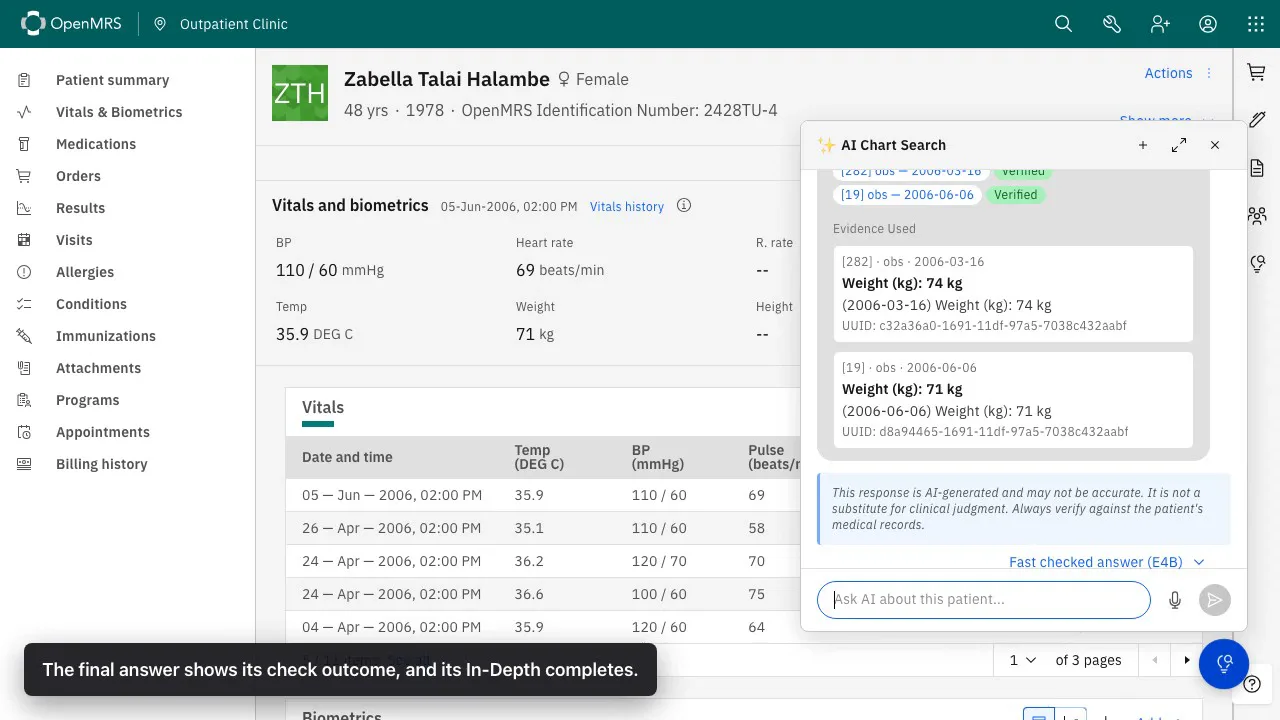
ChartSearchAI is the framework's example implementation for point-of-care chart search. Fresh installations retain the bundled provider; deployments may configure the same lifecycle through Med Agent Hub. The recording uses that configured Hub provider and stores each stage in one chat message. The initial Answer is displayed before validation and In-Depth finish.

E4B response example Initial Answer, validation state, source records, and In-Depth.
1:45 · silent recording at 2× speed
Transcript (silent recording)
  1. A clinician opens the AI Chart Search panel from a patient's chart and asks a question.
  2. The initial Answer appears, generated by the E4B (checked) model profile.
  3. The same message updates in place to show the validation result: checked, edited, needs review, or unavailable.
  4. Source records appear as reference tiles, showing which chart entries the answer used.
  5. The In-Depth section generates additional detail once the checked answer is available.
01Initial Answer

Displayed when the answer stage finishes.

02Validation result

The same message records checked, edited, needs review, or unavailable.

03Source records

References show the chart entries used by the final answer.

More recorded examples

Additional OpenMRS sessions.

These recordings use the local OpenMRS stack with the configured Med Agent Hub provider. Captions identify the stage shown; the bundled provider remains a supported separate path.

12B profile 7:09

12B multi-turn session

Shows the Answer, validation update, evidence, In-Depth, and a new question that interrupts unfinished In-Depth.

Transcript (silent recording)
  1. A clinician asks a question using the 12B model profile; the initial Answer appears.
  2. The message updates with the validation result and resolved evidence tiles.
  3. The In-Depth section begins generating additional detail.
  4. Before In-Depth finishes, the clinician asks a new question, which interrupts the unfinished In-Depth and starts a new answer cycle.
  5. The conversation continues, with each new question following the same checked-answer lifecycle.
OpenMRS chart with the AI Chart Search panel showing verified evidence records for a weight trend answer

Evidence tiles OpenMRS

Resolved chart records

Each tile shows the record type, date, value used, source identifier, and grounding result.

Med Agent Hub

How each answer is produced.

ChartSearchAI owns the OpenMRS workflow and can execute it through either its bundled provider or a configured Med Agent Hub provider. The recording uses Hub; the five stages below are the shared lifecycle shown in the demo above.

1 Context

Load patient records and source provenance.

2 Answer

Generate the initial answer with the selected profile.

3 Check

Apply deterministic temporal and output rules.

4 Evidence

Resolve citations and record grounding results.

5 In-Depth

Generate additional detail from the checked answer.

Example implementation 2 of 2 · Catalyst

Catalyst: plain-language questions over laboratory and program data.

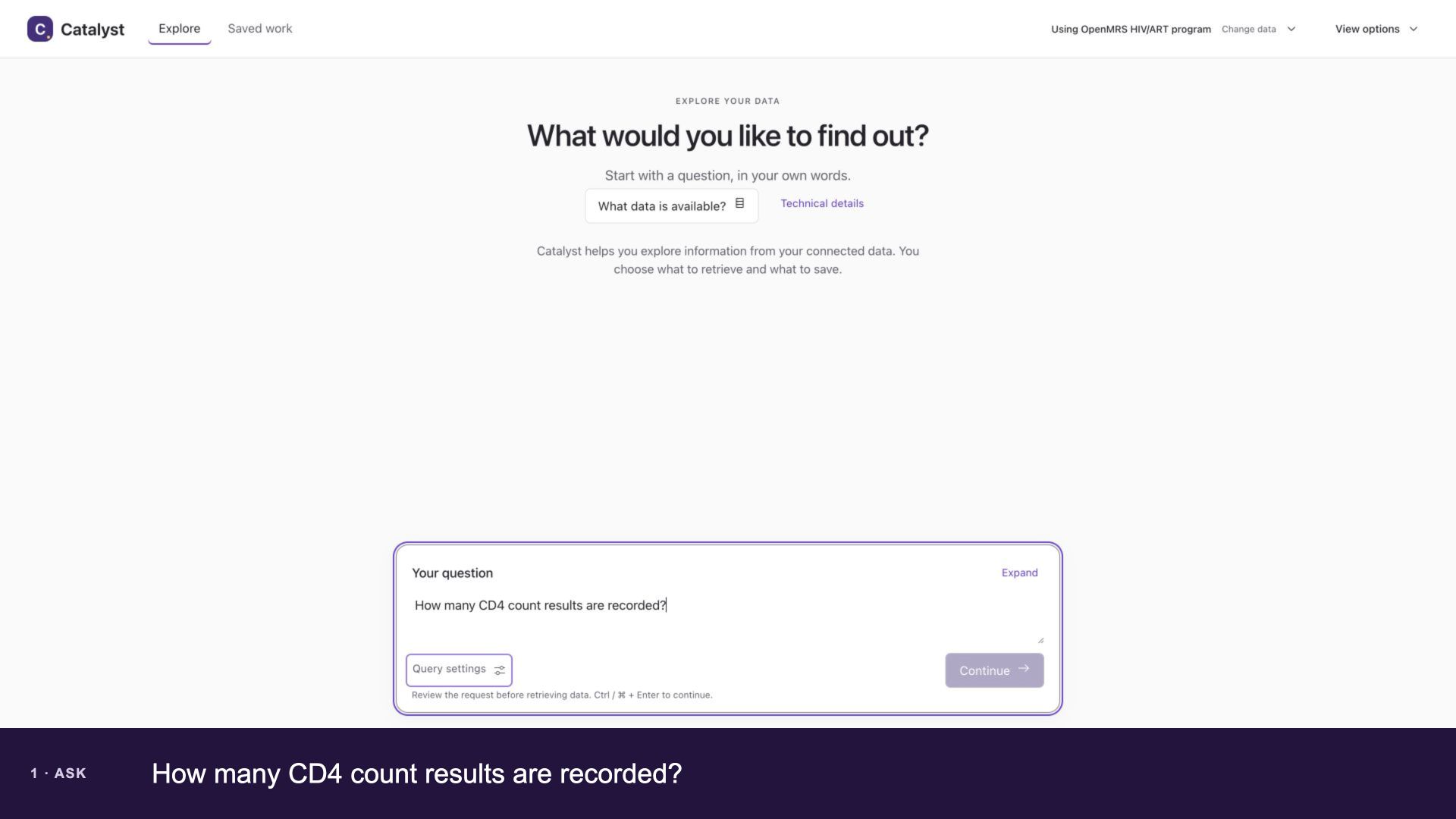
Catalyst is the framework's example implementation for program-monitoring and reporting questions — viral load coverage, CD4 counts, specimen turnaround — directly from laboratory (OpenELIS) and HIV program (OpenMRS) databases. It turns a question into SQL against a catalog generated from the database itself. A writer model drafts the query, a selected profile may add a reviewer, and a deterministic policy allows only read-only execution. Results are typed tables, and a follow-up instruction refines the exact current query.

OpenELIS laboratory 0:53

Laboratory results, then turnaround detail

A viral load question generates and runs, then a follow-up adds the result unit and specimen receipt-to-release time to the same query.

Transcript (silent recording)
  1. Turn 1: the question "Show viral load results since 2026-01-01 with patient, value, and observed date" is asked against the OpenELIS laboratory data source.
  2. A writer model drafts SQL against the generated catalog; a reviewer model checks it.
  3. The query is validated, executed read-only, and results return as a typed table.
  4. Turn 2: the follow-up "Also include the result unit and how many minutes elapsed between specimen receipt and result release" refines the same query rather than starting over.
  5. The refined query is validated and executed; the result table now includes the added columns.

OpenMRS HIV/ART program 0:52

Program data on a second source

The same workbench targets a separate HIV program database: a CD4 count question, then a follow-up adding gender and birth date.

Transcript (silent recording)
  1. The OpenMRS HIV/ART program data source is selected before asking a question.
  2. Turn 1: the question "Show CD4 count results since 2026-01-01 with patient, value, and observed date" is asked.
  3. A writer model drafts SQL against the generated catalog; a reviewer model checks it, then the query is validated and executed read-only.
  4. Turn 2: the follow-up "Also include the patient's gender and birth date" refines the same query.
  5. The refined query is validated and executed; the result table now includes gender and birth date.
01Two data sources

OpenELIS laboratory and OpenMRS HIV/ART program data, each with its own database and generated catalog.

02Checked execution

Generated SQL is validated, executed read-only, and compared against independently authored gold queries.

03Published pre-refactor run

12 of 12 live scenario repetitions passed, 384 assertions, on real models and PostgreSQL; current-pin acceptance remains open.

Catalyst pipeline

How each query is produced.

Catalyst Gateway owns the query profiles, prompts, lint, review composition, SQL policy, and evidence. It calls Med Agent Hub only as a generic single-role model executor. The four stages below are the lifecycle shown in the demos above.

1 Draft

A writer model drafts SQL against the generated catalog.

2 Review

A reviewer model checks the draft query against the catalog and the question.

3 Validate

The query is checked for read-only policy compliance before it can run.

4 Execute

The validated query runs read-only against the analytics database.

Evaluation

Published validation runs.

The harness records configuration, per-cell answers, source traces, deterministic checks, and judge outputs. Reports show both aggregate scores and individual answers. They are research results, not product certifications.

Evaluation reports
OpenClinAI validation reports index showing a published model comparison and its clinical scoring table
The report index links to aggregate results and individual run details.

Where to go next

Three ways in.

Run it

The stack runs on a single workstation-class machine — CPU inference or one consumer GPU — against your own OpenMRS/OpenELIS databases.

Project documentation

Read the evidence

Every comparison run is published: configuration, per-answer traces, deterministic checks, and judge outputs.

Evaluation reports

Reproduce a run

Catalyst, the validation harness, and Med Agent Hub are open source, with the run manifest needed to reproduce a published result.

Validation harness (GitHub)