ChartSearchAI

Ask questions about a patient’s chart.

Ask questions about a patient’s history, explore trends and inspect the source records behind an answer. ChartSearchAI brings this workflow into OpenMRS.

OpenMRS integration · Recorded examples

ChartSearchAI in the patient chart.

ChartSearchAI is an application for patient-chart questions in OpenMRS. Fresh installations retain the bundled provider; deployments may configure the same lifecycle through Med Agent Hub. The recording uses that configured Hub provider and stores each stage in one chat message. The initial Answer is displayed before validation and In-Depth finish.

E4B response example Initial Answer, validation state, source records, and In-Depth.
1:45 · silent recording at 2× speed
Transcript (silent recording)
  1. A clinician opens the AI Chart Search panel from a patient's chart and asks a question.
  2. The initial Answer appears, generated by the E4B (checked) model profile.
  3. The same message updates in place to show the validation result: checked, edited, needs review, or unavailable.
  4. Source records appear as reference tiles, showing which chart entries the answer used.
  5. The In-Depth section generates additional detail once the checked answer is available.
01 Initial Answer

Displayed when the answer stage finishes.

02 Validation result

The same message records checked, edited, needs review, or unavailable.

03 Source records

References show the chart entries used by the final answer.

More recorded examples

Additional OpenMRS sessions.

These recordings use the local OpenMRS stack with the configured Med Agent Hub provider. Captions identify the stage shown; the bundled provider remains a supported separate path.

12B profile 7:09

12B multi-turn session

Shows the Answer, validation update, evidence, In-Depth, and a new question that interrupts unfinished In-Depth.

Transcript (silent recording)
  1. A clinician asks a question using the 12B model profile; the initial Answer appears.
  2. The message updates with the validation result and resolved evidence tiles.
  3. The In-Depth section begins generating additional detail.
  4. Before In-Depth finishes, the clinician asks a new question, which interrupts the unfinished In-Depth and starts a new answer cycle.
  5. The conversation continues, with each new question following the same checked-answer lifecycle.
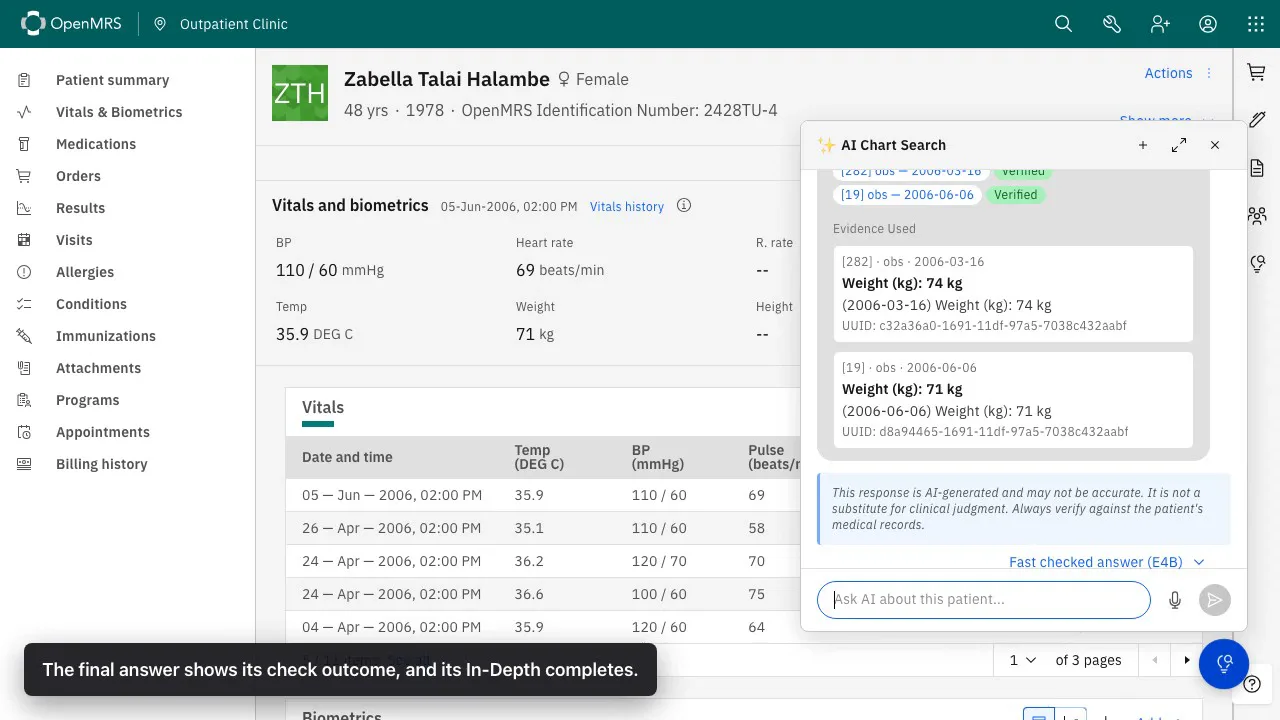
OpenMRS chart with the AI Chart Search panel showing verified evidence records for a weight trend answer

Evidence tiles OpenMRS

Resolved chart records

Each tile shows the record type, date, value used, source identifier, and grounding result.

Med Agent Hub

How each answer is produced.

ChartSearchAI owns the OpenMRS workflow and can execute it through either its bundled provider or a configured Med Agent Hub provider. The recording uses Hub; the five stages below are the shared lifecycle shown in the demo above.

1 Context

Load patient records and source provenance.

2 Answer

Generate the initial answer with the selected profile.

3 Check

Apply deterministic temporal and output rules.

4 Evidence

Resolve citations and record grounding results.

5 In-Depth

Generate additional detail from the checked answer.
Evidence and development resources

Read the recorded findings, learn about related tools or follow development.

Model output may be wrong or incomplete. Review the underlying chart and distinguish the initial answer from later checks and additional detail.